As you can see if you tried to modify the admin's name by calling the prototype's setter function the state change will be enforced on `admin` and not `user`! Even though you are calling `user`'s setter method. This is because `this` always binds to the object that it is called on, and in this case, it is assigning `admin.name` and `admin.last` to be `"Another"` and `"person"` respectively. `user` is unchanged.
Even if you do something like this: ```javascript let user = { name: "Ricky" last: "Lu" }; let admin = {}; admin.name = "Another"; admin.last = "person"; user -> Will still be "Ricky Lu" admin -> Will be "Another person", because it is assigning name and last property to admin ``` This behavior is needed because you wouldn't want to modify the prototype's state if multiple object has it as it's prototype, the changes will be untraceable and should be on the object itself not prototype! ##### for...in loop Using `for...in` it will iterate over the inherited properties as well if it is enumerable, however, `Object.keys(obj)` will only return the keys this object has itself, not inherited ones: ```javascript let animal = { eats: true }; let rabbit = { jumps: true, __proto__: animal }; // Object.keys only returns own keys console.log(Object.keys(rabbit)); // jumps // for..in loops over both own and inherited keys for(let prop in rabbit) console.log(prop); // jumps, then eats ``` ### Native prototypes These are the built-in prototypes that all of the objects inherits from. ##### Object.prototype This is the default prototype that any object created inherits from. And itself's prototype is just `null` because there is no one above it. This object has some default method that all object contains `toString, hasOwnProperty,...` ##### hasOwnProperty(prop) Return `true/false` depending on whether or not the object has that particular property itself, and not inherited. ##### Array.prototype/Function.prototype/Number.prototype These are the other prototypes that some of the objects that you create inherits from such as Arrays, Functions, and Numbers. You can verify that they indeed are those prototype by comparing say `[1, 2].__proto__ == Array.prototype` it will be equal to `true`. [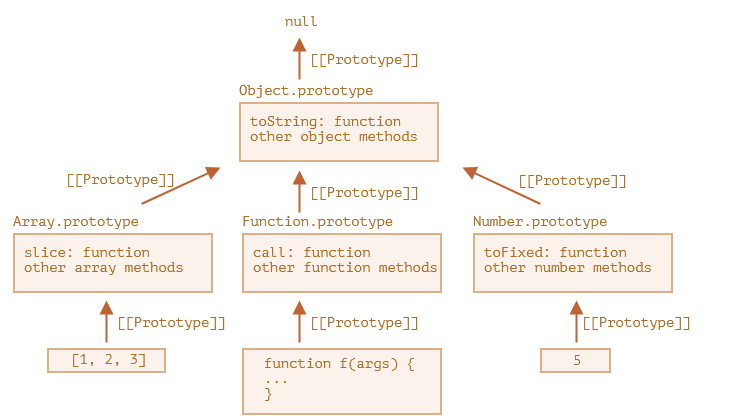](https://wiki.tamarine.me/uploads/images/gallery/2022-12/T2simage.png) ##### Primitives Primitives aren't objects, but somehow we are able to access methods on them, how does that work? Well when you try to access their methods a temporary wrapper objects are created using the built-in constructors `String, Number, Boolean`. They provide the methods and then disappear. The process of creation are invisible to us and engines optimize them out mostly. `null` and `undefined` have no object wrapper, so they have no methods or properties.One of the interesting thing that you can do with primitive prototypes is that you can add some custom properties or method that can be used by all primitives. `String.prototype.foo = 5;` will allow all strings to access a foo property. `let x = 5;` you can do `x.foo` to get 5.
### Interesting aside If you set a property to an object and marked it as `enumerable: false`, and you `console.log` the object, that property will not show up because it is not iterated over using `for...in` loop! ### F.prototype When writing constructor functions, i.e. functions that are called with `new F()`, where `F` is a constructor function we can take advantage and use `F.prototype` to do prototype inheritance as well. If we assigned an object to `F.prototype` then when `new F()` is invoked, the object that is created will have its `__prototype__` pointed to the object that we have assigned. So it is another way that we can do prototype inheritance, instead of setting it manually after the object is created using `{...}`. ```javascript let animal = { eat: true }; function Rabbit(name) { this.name = name; } Rabbit.prototype = animal; let rabbit = new Rabbit("White"); // rabbit.__proto__ == animal console.log(rabbit.eat); // true ```Keep in mind that `F.prototype` is only used when `new F()` is called, so if you decide to change it prototype after you created the object, future object created using the constructor function will have the newer prototype, but existing object keep the old one.
This only concerns with constructor methods, nothing else. ### Modern way of setting \[\[prototype\]\] `.__proto__` is an old way of letting you access and set `[[prototype]]` and its usage is generally discourage. The modern way of setting `[[prototype]]` is to use the methods: - `Object.getPrototypeOf(obj)`: This returns the prototype of the object, same as doing `.__proto__` getter - `Object.setPrototypeOf(obj, proto)`: This sets the prototype of the `obj` to be `proto`, same as doing `.__proto__` setter - `Object.create(proto, [descriptors])`: Allows you create an object with the specified prototype and optionally descriptors, this is the same as doing `{__proto__: ... }` ##### True dictionary The bad usage of `.__proto__` becomes apparent if we decides to keep a key-value pair mapping using object. If we allow the user to enter any kind of key-value pair mapping and if they decides to enter `__proto__` and map to say `5`, it would be invalidated, because using `__proto__` you can only assign it another object or `null`. This isn't the behavior that a dictionary would want right? To fix this we can use `Map` or a real empty object, an object with no inherited prototype to begin with to inherit the setter and getter for `__proto__` via `Object.create(null)`. Now we are able to do: ```javascript let empty = Object.create(null); // No prototype inherited empty.__proto__ = 5; console.log(empty.__proto__); // 5 ```