
Model Context Protocol (MCP)
The need for MCP
Currently, AI is being trained on millions / billions of data, they know questions to numerous general questions and have advance reasoning skills that allows them to answer even the most complex questions.
However, their knowledge are limited to the data that they are pre-trained on which means they will not be able to access your google calendar to know about your future plans, or execute the SQL query to know the current result from the database, it is clear that they are awesome but yet limited.
Our demands are definitely sky-rocketing now that we know the potential of AI, developers would have to build and train their own custom integration for every combination of model and tools. OpenAI have this feature called Function calling which allows interface of external system and access data outside of the their training data, but this is a vendor specific feature.
MCP to the Rescue
MCP is an open source standard developed by Anthropic that allows AI to connect to external systems. This is like a power up for the AI which allows them to access data sources like local files, databases, perform function calling like search engines, calculator, and workflows like specialized prompts.
USB-C port for AI applications that bridge AI with external system
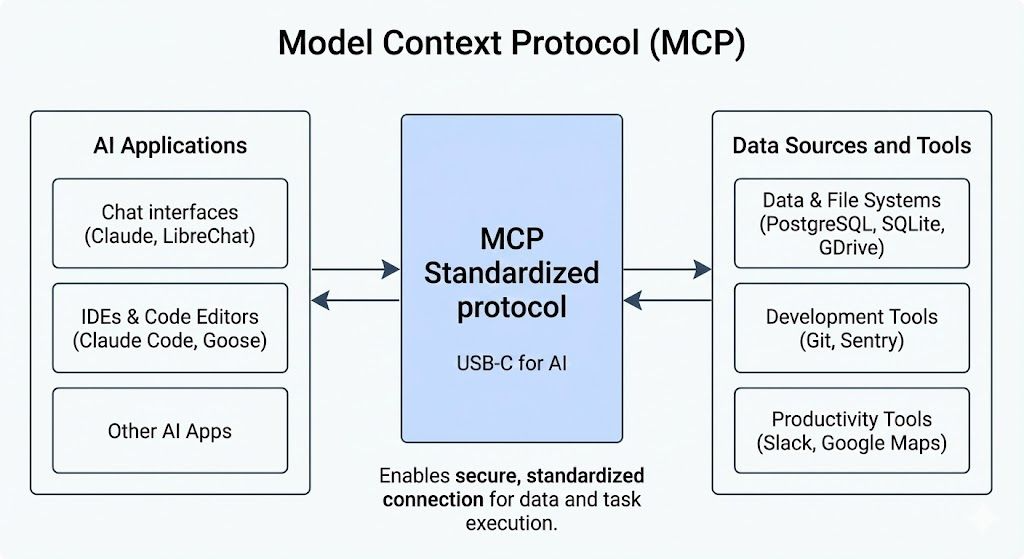
MCP Architecture
MCP follows a simple client-server architecture.
MCP Host: User-facing AI application, this is where the AI model lives and interacts with the user handling their prompt.
MCP Client: This is the component of the host that handles the low-level communication with the MCP server. They are instantiated by the host to communicate with the particular MCP server, think of it as tiny elves that talks with santa.
MCP Server: This is the server that exposes the extra capabilities (tool, data, workflow) to the MCP Client.
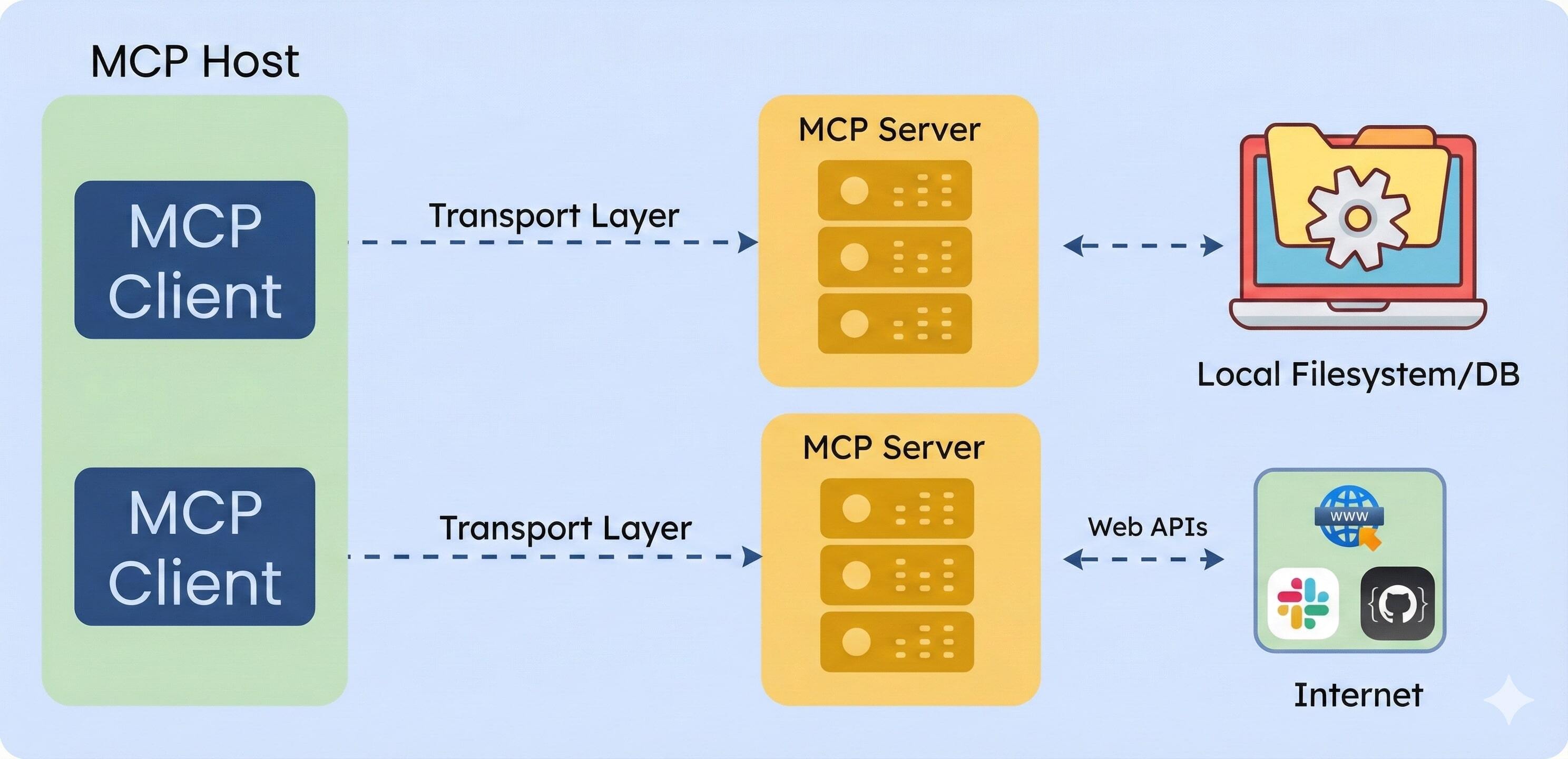
MCP Server
The server can provide the following capabilities:
- Tools: These are the functions that the AI can call to actually carry out an action, sending email, making an API request to somewhere else, update the database, so on and so forth
- Resources: Provide a read-only data to the AI model. The resource can be a database record or a knowledge base
- Prompts: Prompts are predefined templates or workflows that the server can provide
Transport Layer Communication
To support the client and server model, MCP uses JSON-RPC 2.0 messages to communicate and there are two main ways:
- Standard input/output: Good for local environment, fast and synchronous message transmission
- Server-Sent Events (SSE): Good for remote resources, efficient, real-time, one-way data streaming from the server to the client
How does it Work?
Let's say you have an AI connected to Claude and you asked the AI - "Find the latest sales report in our database and email it to my manager."
- The first step would be tool discover: When you open Claude Desktop it connects to your configured MCP server and asks, "What can I do with the tools that I have available?" and each of the MCP server responds with the available tools.
- Understanding your requirement: Claude reads your prompt and analyzes which of the tools that it has in it's belt can best answer your question (Database query and Email sender)
- Ask for Permission: Before any of the external actions happens, Claude will ask your for permission, nothing will proceed without your explicit approval and that's MCP's security model
- Query the database: Through the MCP server Claude is able to do a database lookup
- Sending the email: Then finally Claude triggers a second approval for actually sending out the email
- Summary: Once all the interactions with the MCP is done, Claude does a summary of the entire process.
MCP vs RAG
They are built to serve different purposes.
RAG: Supply relevant knowledge that is stored in a vector database.
MCP: Allows AI to perform real-world actions.
No comments to display
No comments to display